Is your GE ice maker not working like it used to? Maybe it’s making little or no ice, or the ice cubes are stuck inside.
Don’t worry—you can fix this yourself by resetting your ice maker. This simple step can save you time and money, and get your ice flowing again quickly. Keep reading, and you’ll learn exactly how to reset your GE ice maker easily, so you can enjoy cold drinks without hassle.
Troubleshooting Common Issues
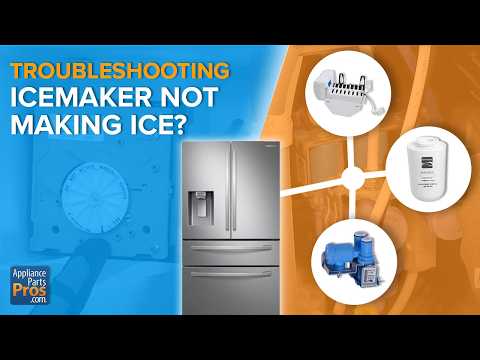
Troubleshooting common issues with your GE ice maker can save time and avoid costly repairs. Many problems can be fixed by a simple reset. Before resetting, knowing the signs and causes helps pinpoint the issue. This section guides you through identifying ice maker problems and recognizing when a reset is necessary.
Identifying Ice Maker Problems
Check for these typical ice maker problems:
- No ice production at all
- Ice cubes are small or misshapen
- Ice maker is making unusual noises
- Water leaks inside the freezer
- Ice dispenser is jammed or not working
Inspect the water supply line for blockages or kinks. Make sure the freezer temperature is between 0°F and 5°F. A dirty or frozen water filter can also cause issues. Look for visible ice build-up around the ice maker parts.
Signs Your Ice Maker Needs Resetting
Reset the ice maker if you notice these signs:
- Ice production has stopped suddenly
- Ice cubes are stuck inside the tray
- The ice maker won’t cycle through its normal process
- Control panel lights are blinking or showing error codes
- Ice dispenser won’t release ice even when the freezer is cold
Resetting can clear minor electrical or mechanical glitches. It helps restart the ice making cycle smoothly. Always check the user manual for reset button location or reset steps specific to your GE model.
Credit: www.appliancerepairfortlauderdalefl.net
Safety Precautions
Resetting your GE ice maker requires care and attention to safety. Taking precautions protects you from electrical hazards and water damage. Following these simple steps keeps the process safe and smooth.
Unplugging The Appliance
Always unplug the ice maker before starting any reset. This stops electrical current and prevents shocks. Use the wall outlet switch if available. Never pull the cord to disconnect the power.
Wait a few minutes after unplugging before touching any parts. This lets internal components cool down safely.
Avoiding Water Spillage
Turn off the water supply to the ice maker before resetting. This stops leaks and flooding. Place towels or a shallow container under the ice maker to catch any drips.
Check all water connections for tightness. Loose fittings can cause spills during the reset process.
Locating The Reset Button
Locating the reset button on your GE ice maker is essential for troubleshooting. The reset button helps restart the ice maker after a pause or error. Knowing where this button is can save time and avoid unnecessary repairs.
Finding The Ice Maker's Reset Button
The reset button is usually small and hard to spot at first. It often sits near the ice maker's control module. Check inside the freezer compartment, near the ice tray or motor. Some models have the button on the front or side panel of the ice maker. Look for a small, round button labeled “Reset” or with a symbol.
Understanding Button Functions
The reset button restarts the ice maker cycle after a problem. Pressing it can clear minor jams or errors. Other buttons might control test modes or power on/off. Avoid pressing buttons without knowing their function. The reset button usually requires a firm press for a few seconds. This action signals the ice maker to begin a new cycle.
Step-by-step Reset Process
Resetting your GE ice maker can fix many common issues quickly. The process is simple and requires just a few actions. Follow the steps carefully to ensure your ice maker starts working again without problems.
Pressing The Reset Button
Locate the reset button on your GE ice maker. It is usually a small, square button inside the ice maker compartment or on the control panel. Press and hold the button for about 10 seconds. You might hear a chime or see a light flash, signaling the reset started.
Waiting For The Cycle To Complete
After pressing the reset button, the ice maker begins a new cycle. This cycle can take up to an hour to finish. During this time, avoid opening the freezer door frequently. Let the ice maker complete its process to ensure proper reset and ice production.
Manual Reset Techniques
Manual reset techniques give you direct control over your GE ice maker, allowing you to fix common issues without waiting for a technician. These methods can quickly restore function if the ice maker is stuck or not producing ice. Understanding these simple tricks can save you time and hassle, especially when you need ice fast.
Power Cycling The Ice Maker
Power cycling is a straightforward way to reset your ice maker. Start by unplugging the refrigerator or switching off the circuit breaker for about 5 minutes. This pause lets the system reset its internal controls.
After waiting, plug the fridge back in or turn the breaker on. You might hear a click or see the ice maker start to move, indicating it's rebooting. This technique often clears minor glitches without any tools.
Have you noticed how a quick power reset can fix your electronics? Ice makers respond the same way. It’s worth trying before diving into more complex fixes.
Using The Feeler Arm
The feeler arm controls the ice maker’s operation by sensing the ice level. If it’s stuck or out of position, the ice maker can stop working. Gently lifting and lowering this arm can trigger a manual reset.
Make sure to move the feeler arm slowly to avoid damage. You should feel a small click when it resets. This simple action signals the ice maker to begin a new cycle.
Check if the arm is blocked by ice or debris before resetting. Clearing obstructions can prevent future stoppages and keep your ice maker running smoothly.
Checking Water Supply
Checking the water supply is key to resetting your GE ice maker. Without water, the ice maker cannot function correctly. Make sure the water reaches the ice maker properly. Low water flow or a disconnected supply can cause issues.
Ensuring Proper Connection
Confirm the water line connects firmly to the ice maker. Look for any loose fittings or kinks in the tube. A loose connection can stop water from entering the ice maker. Tighten any loose parts and straighten bent tubes. Check the water valve to ensure it is open fully.
Adjusting Water Flow
Water flow should be steady and strong. If water flows too slowly, ice production slows down or stops. Adjust the water valve to increase the flow. Clear any blockages in the water line. Sometimes, sediment or ice clogs reduce water flow. Use a soft cloth or small brush to clean the inlet screen gently.
Inspecting Ice Maker Components
Inspecting ice maker components is essential for proper maintenance and resetting. It helps identify parts that may cause the ice maker to stop working. Regular checks keep the ice maker running smoothly and extend its life.
Focus on parts that control water flow and ice production. Clean, functional components ensure the ice maker refills and freezes correctly. This section explains how to examine key parts carefully.
Examining The Water Inlet Valve
The water inlet valve controls water entering the ice maker. Check if it is clogged or damaged. A blocked valve stops water flow and ice production.
- Unplug the refrigerator before inspection.
- Locate the valve behind or under the fridge.
- Look for dirt, debris, or mineral buildup.
- Test the valve for electrical continuity using a multimeter.
- Replace the valve if it shows damage or no continuity.
Cleaning The Ice Maker
Dirt and ice buildup can block the ice maker’s parts. Clean the ice mold and ejector blades gently. Avoid harsh chemicals; use warm water and mild soap.
- Turn off the ice maker before cleaning.
- Remove ice cubes stuck inside the mold.
- Wipe all accessible parts with a soft cloth.
- Check for any visible cracks or broken parts.
- Allow the components to dry fully before restarting.

Credit: www.reddit.com
When To Seek Professional Help
Knowing when to seek professional help with your GE ice maker can save you time and prevent further damage. Sometimes, despite your best efforts to reset and troubleshoot, the problem persists. Recognizing these moments is crucial to avoid frustration and costly repairs.
Identifying Persistent Issues
Does your ice maker keep stopping or producing no ice even after multiple resets? Are you noticing strange noises or leaks that don’t go away? These are signs that the issue might be beyond a simple reset.
Repeated problems like:
- Ice cubes that are misshapen or hollow
- Continuous error lights or blinking indicators
- Water not filling the ice tray properly
often point to internal components malfunctioning or electrical faults.
Ask yourself if you've tried all basic troubleshooting steps. If yes, and the problem remains, it’s time to consider expert assistance.
Contacting A Technician
When you decide to call a professional, choose someone experienced with GE appliances. They know the common issues and specific parts that might need replacement or repair.
Prepare for the visit by noting down:
- What symptoms your ice maker shows
- How long the problem has lasted
- Any error codes or indicator lights
This information helps the technician diagnose the problem quickly and accurately. Don’t hesitate to ask questions about the repair process or costs upfront.
Have you ever ignored a small ice maker problem that later turned into a bigger issue? Getting professional help early can prevent that from happening.
Preventative Maintenance Tips
Keeping your GE ice maker running smoothly means staying ahead with preventative maintenance. Small, regular efforts can save you from bigger issues down the line. You might think resetting is the only fix, but maintaining your ice maker prevents frequent resets altogether.
Regular Cleaning Schedule
Ice makers build up mineral deposits and mold quickly if left unchecked. Set a cleaning routine every 1 to 3 months depending on your water hardness. Use a mixture of warm water and vinegar or a commercial ice maker cleaner to wipe down the ice bin and dispenser parts.
Don’t forget to clean the water filter regularly. A clogged filter reduces water flow, affecting ice quality and production speed. Have you noticed your ice tastes odd or looks cloudy? That’s a sign it’s time to clean.
Monitoring Ice Production
Watch how much ice your machine produces daily. A sudden drop in ice output can signal a problem before it gets worse. Keep an eye on whether the ice cubes are smaller or misshapen, which often indicates a water supply or temperature issue.
Try keeping a simple log for a week to spot trends or irregularities. This habit helps you catch early signs of malfunction and know when it’s time to reset or call for service. How often do you check your ice maker’s performance?

Credit: www.familyhandyman.com
Frequently Asked Questions
How Do I Reset My Ge Ice Maker Quickly?
To reset a GE ice maker, locate the reset button inside the freezer. Press and hold it for 10 seconds. Release the button and wait for the ice maker to restart. This simple reset often resolves common ice production issues promptly.
Why Is My Ge Ice Maker Not Making Ice?
Common reasons include a frozen water line, clogged filter, or a power issue. Resetting the ice maker can help. Also, check the water supply and temperature settings. Regular maintenance ensures consistent ice production.
How Often Should I Reset My Ge Ice Maker?
Resetting is typically only needed during troubleshooting. Regular resets aren't necessary. If your ice maker frequently needs resetting, it may indicate a deeper problem requiring professional service.
Can Resetting Fix Ge Ice Maker Water Flow Issues?
Yes, resetting can clear minor control glitches affecting water flow. However, persistent water supply problems might need checking the inlet valve or water filter for blockages.
Conclusion
Resetting your GE ice maker can solve many common problems. Follow the steps carefully for best results. Patience matters—give the ice maker time to restart. Regular maintenance helps keep it working well. Small fixes often save you from costly repairs.
Keep your ice maker clean and free from blockages. Now, enjoy fresh ice without hassle or worry. Simple actions make a big difference in performance. Stay calm and take one step at a time. Your ice maker will thank you with steady ice supply.