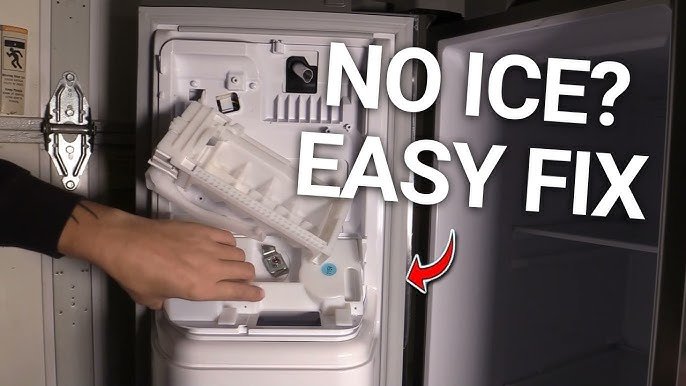
Is your Samsung refrigerator’s ice maker working overtime, making more ice than you need? Maybe you’re running low on freezer space or just want to save energy.
Whatever the reason, knowing how to turn off the ice maker can save you hassle and give you more control over your fridge. You’ll learn simple, step-by-step instructions to easily switch off your Samsung ice maker—no tools or technician needed.
Keep reading, and you’ll have the power to stop unwanted ice production in minutes.
Locating The Ice Maker
Finding the ice maker in a Samsung refrigerator is the first step to turning it off. Knowing its exact location helps avoid confusion and saves time. Most Samsung models have the ice maker inside the freezer section. It is usually attached to the freezer ceiling or on the side wall.
Some models have the ice maker behind a cover or panel. Others show it clearly near the ice bin. Identifying the ice maker allows you to access the control switch or lever easily. This is important for stopping ice production quickly.
Inside The Freezer Compartment
Open the freezer door and look at the top or side walls. The ice maker often sits near the upper corner. It may have a small plastic cover protecting it. The ice bin is usually right below the ice maker. This setup makes it easy to spot.
Behind The Ice Bin
Remove the ice bin to see the ice maker clearly. The bin stores ice cubes made by the machine. The ice maker has a metal arm or switch nearby. This arm controls ice production and can be moved to turn off the ice maker.
Checking The Control Panel
Some Samsung refrigerators have a control panel on the door or inside the freezer. This panel might include an option to turn the ice maker off. Look for buttons or settings labeled “Ice Maker” or “Ice Off.” This is a simple way to stop ice making without opening the freezer.
Turning Off The Ice Maker
Turning off the ice maker in your Samsung refrigerator helps save water and energy. It also prevents ice buildup when you do not need ice. The process is simple and can be done using the control panel or a manual switch. Both ways ensure the ice maker stops producing ice quickly and easily.
Using The Control Panel
Most Samsung refrigerators have a control panel on the front. Use it to turn off the ice maker without opening the fridge door. Look for the ice maker button or icon on the panel. Press and hold the button for a few seconds. The ice maker will stop making ice, and the indicator light will turn off. This method is quick and does not require any tools.
Manual Switch Method
Some Samsung models have a manual switch inside the freezer. Open the freezer door and locate the ice maker. Find the small switch or lever on the ice maker unit. Slide or flip the switch to the “off” position. This stops water flow to the ice maker. The ice production will cease immediately. This method is useful if the control panel does not have an ice maker option.
Disabling The Ice Maker For Specific Models
Disabling the ice maker on your Samsung refrigerator varies depending on the model you own. Each design has its own way of turning off the ice production to save water or stop ice buildup. Knowing the exact steps for your model ensures you don't accidentally affect other functions or settings.
French Door Models
French door refrigerators often have a control panel on the front where you can manage the ice maker. Look for an "Ice Off" button or setting on the display panel. Press and hold this button for a few seconds until the indicator light turns off, signaling the ice maker is disabled.
If your model doesn’t have a clear "Ice Off" option, check the user manual for the specific combination of buttons to press. Sometimes, you might need to open the ice bin and manually switch the ice maker arm to the "off" position. This simple physical step often stops ice production immediately.
Side-by-side Models
Side-by-side Samsung refrigerators usually feature a dedicated ice maker switch inside the freezer compartment. Open the freezer and locate the ice maker on the side or top wall. You will find a small switch or lever that can be toggled to turn off the ice maker.
Another option is to use the control panel on the fridge door. If your model has an electronic control, you might need to press a combination of buttons or access a menu to disable the ice maker. It’s useful to keep the manual handy for these models because the steps can differ slightly between versions.
Bottom Freezer Models
With bottom freezer Samsung refrigerators, the ice maker is usually inside the freezer compartment, often near the back. To turn it off, locate the power switch on the ice maker unit itself. Sliding or pressing this switch will stop ice production immediately.
Some bottom freezer models may also require you to remove the ice bin and manually stop the ice maker arm. If your fridge has a digital panel, check if there’s an option to disable the ice maker electronically. Remember, turning off the ice maker helps avoid leaks and saves energy when you don’t need ice.

Credit: www.espares.co.uk
Checking For Power And Water Supply
Checking the power and water supply is key before turning off the ice maker in your Samsung refrigerator. Without power, the ice maker won’t respond to any controls. Water supply issues can cause the ice maker to stop working or make it harder to turn off properly.
Start by confirming the refrigerator is plugged in and receiving electricity. Then, check the water line to ensure it is connected and open. These simple checks help avoid confusion and ensure the ice maker turns off smoothly.
Confirming The Refrigerator’s Power Connection
Look at the power cord behind the fridge. Make sure it is fully plugged into the wall outlet. Check the outlet by plugging in another device like a lamp. If the lamp works, the outlet is fine.
Check your home’s circuit breaker if the outlet has no power. A tripped breaker may need resetting. This restores power to the refrigerator and ice maker.
Inspecting The Water Supply Line
Find the water valve connected to the refrigerator. It usually sits under the sink or near the fridge. The valve should be open, allowing water to flow freely.
Look for kinks or damage in the water line. A bent or pinched tube blocks water flow. Straighten or replace the tube if needed. This ensures water reaches the ice maker properly.
Testing The Water Filter Status
Check the water filter inside the fridge. A clogged filter can stop water from reaching the ice maker. Look for indicator lights or messages on the display panel.
Replace the filter if it is past its recommended use period. A fresh filter supports smooth water flow and ice production control.
Troubleshooting Common Issues
Dealing with ice maker issues in your Samsung refrigerator can be frustrating, especially when you just want a simple glass of ice. Knowing how to troubleshoot common problems can save you time and prevent unnecessary service calls. Let’s look at two frequent issues and how you can handle them effectively.
Ice Maker Not Responding
If your ice maker isn’t producing ice at all, start by checking the power switch. Sometimes it’s as simple as the ice maker being turned off or the switch being accidentally flipped.
Next, inspect the water supply line. A kinked or frozen line can stop water flow, causing the ice maker to go silent. Make sure the water filter isn’t clogged, as a dirty filter can reduce water pressure.
Have you checked the temperature inside the freezer? The ice maker won’t work properly if it’s too warm. The ideal freezer temperature for ice production is around 0°F (-18°C).
Ice Maker Continues To Produce Ice
When your ice maker won’t stop making ice, it might lead to overflowing bins or ice jams. First, check if the ice bucket is properly positioned. Misalignment can prevent the ice maker from sensing when to stop.
Another cause could be a faulty sensor or switch. If the sensor thinks the bin is never full, it will keep running. Testing or replacing the sensor might be necessary if repositioning doesn’t help.
Have you noticed any frost buildup around the ice maker? Excess frost can interfere with the ice maker’s operation. Defrosting the freezer manually or running an automatic defrost cycle may solve the problem.

Credit: www.espares.co.uk
Reactivating The Ice Maker
Turning off your Samsung refrigerator's ice maker is often necessary for maintenance or when you need to pause ice production. However, getting it back up and running smoothly is just as important. Reactivating the ice maker is a straightforward process that ensures you continue enjoying a steady supply of ice without hassle.
Checking The Ice Maker Switch Or Lever
Start by locating the ice maker switch or lever inside your refrigerator’s freezer compartment. This small control often controls the ice maker’s power state.
Make sure the switch is flipped to the “On” position or the lever is lowered. If it’s stuck or feels loose, gently move it a few times to ensure it’s not jammed.
Resetting The Ice Maker
Sometimes, the ice maker might not restart immediately due to an internal error or after a long pause. You can reset it by pressing and holding the reset button, usually found on the ice maker module.
Hold the button for about 10 seconds until you hear a chime or see the ice maker begin its cycle. This action clears any glitches and kickstarts the ice production process.
Ensuring Proper Water Supply
Without water, your ice maker can’t function no matter how many times you switch it on. Check that the water line connected to your fridge is open and flowing.
Look for any kinks or blockages in the water tube that might be preventing water from reaching the ice maker. It’s a simple step that often solves the problem instantly.
Verifying Temperature Settings
Your ice maker won’t produce ice if the freezer temperature is set too high. Make sure your freezer is below 32°F (0°C) for optimal ice production.
Adjust the temperature settings if necessary, and give the ice maker a few hours to start producing ice again. Cooler conditions are essential for ice formation.
Observing The Ice Production Cycle
After reactivation, keep an eye on the ice maker for the next few hours. Check if it’s filling with water and ejecting ice properly.
If you notice delays or no ice forming, double-check all previous steps or consult your Samsung refrigerator manual for model-specific instructions.
Maintenance Tips
Maintaining your Samsung refrigerator's ice maker is key to keeping it running smoothly and preventing unexpected issues. Small efforts like cleaning and checking for blockages can save you from costly repairs and ensure fresh ice every time. Let’s dive into simple maintenance tips that you can easily do yourself.
Regular Cleaning
Cleaning your ice maker regularly helps avoid mold, odors, and ice buildup. Use a soft cloth and warm water to wipe down the ice tray and the surrounding area.
Try to clean it once a month or more often if you notice any strange smells or discoloration. Avoid harsh chemicals; mild soap works best to keep your ice tasting fresh.
Inspecting For Blockages
Blockages in the ice maker’s water line or dispenser can stop ice production or cause leaks. Check the water inlet valve and tubing for any kinks or frozen parts.
Sometimes small ice chunks can clog the system—gently removing these can restore proper function. Ask yourself: have you noticed slower ice production or strange noises? These can be signs of blockages that need your attention.

Credit: www.espares.co.uk
Frequently Asked Questions
How Do I Turn Off The Ice Maker In A Samsung Fridge?
Locate the ice maker switch inside the freezer compartment. Slide or press it to the "off" position. This stops ice production instantly without unplugging the fridge.
Can I Disable The Ice Maker Without Unplugging The Fridge?
Yes, simply use the ice maker’s power switch or control panel. This allows easy on/off control without affecting the refrigerator’s overall power.
Will Turning Off The Ice Maker Save Energy?
Yes, turning off the ice maker reduces energy use slightly. It stops the ice-making motor and water supply, lowering electricity consumption.
How To Stop Ice Maker From Making Ice Temporarily?
Use the control panel or ice maker switch to pause ice production. This is ideal for short breaks without removing or unplugging components.
Conclusion
Turning off the ice maker in your Samsung refrigerator is quick and simple. Just follow the steps carefully to avoid any issues. This helps save water and energy when you do not need ice. Regularly checking the ice maker keeps your fridge running smoothly.
Now you can control your appliance better and avoid unwanted ice buildup. Keep these tips handy for easy use anytime. Your fridge will thank you.