
Is your Kenmore ice maker not working like it used to? Maybe it’s stopped making ice or is stuck on one cycle.
You don’t have to call a repair technician just yet. Resetting your Kenmore ice maker can often fix these common problems quickly and easily. In this guide, you’ll learn simple steps to reset your ice maker and get it back to producing ice in no time.
Keep reading—your next batch of ice is just a few resets away!
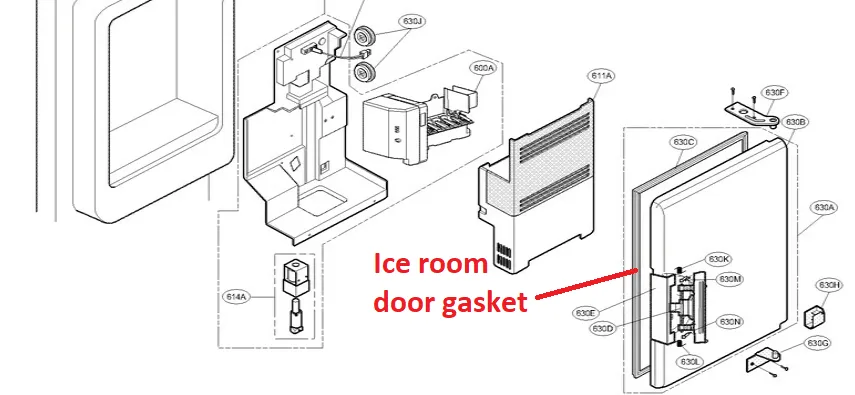
Credit: www.searshomeservices.com
Signs Your Kenmore Ice Maker Needs Resetting
Recognizing when your Kenmore ice maker needs a reset can save time and avoid frustration. The ice maker usually shows clear signs before it stops working properly. Identifying these signs early helps keep your ice supply steady and prevents damage.
Ice Production Stops
The most obvious sign is when ice production suddenly stops. Your ice maker should produce ice regularly. If no ice forms, it may need a reset. This issue could mean the machine is stuck or has a minor glitch.
Ice Tray Is Jammed
A jammed ice tray blocks ice from falling into the bin. Ice cubes can stick together or freeze in place. This stops new ice from being made. A reset can often clear the jam and restart the process.
Water Supply Issues
Ice makers need a steady water supply to work. If water flow is low or stopped, ice making stops too. Check for frozen or blocked water lines. Resetting the ice maker can help if water supply problems cause the issue.
Tools Needed For Resetting
Before you start resetting your Kenmore ice maker, it's important to gather the right tools. Having everything ready will make the process smoother and help you avoid frustration. Plus, using the correct tools protects your appliance from accidental damage.
Basic Tools Checklist
- Screwdriver:A Phillips head screwdriver is usually needed to remove panels or covers.
- Multimeter:Useful for checking electrical connections if you suspect wiring issues.
- Towel or Cloth:To catch any water drips during the reset process.
- Flashlight:Helps you see inside dark compartments.
- Gloves:Protect your hands from sharp edges inside the fridge or freezer.
Do you have all these tools handy? Missing even one can slow you down or cause unnecessary risks.
Safety Precautions
Safety matters when working with appliances. Always unplug your Kenmore ice maker before starting any reset. This prevents electrical shocks and protects the machine's internal components.
Wear gloves to avoid cuts from sharp metal parts inside the freezer. Keep your workspace dry to reduce slipping hazards. Have you checked that your hands and tools are dry before touching any electrical parts?
Taking a moment to follow these safety steps can save you from injury and keep your ice maker in good shape.
Locating The Reset Button
Finding the reset button on your Kenmore ice maker can be a bit tricky if you’re not familiar with the layout. It’s usually tucked away in spots that aren’t immediately obvious. Knowing where to look saves time and frustration, especially when your ice maker suddenly stops working.
Common Locations On Kenmore Models
The reset button is often located inside the freezer compartment. Check the following places:
- On the front panel near the ice maker unit itself
- Behind the ice bucket or inside the ice chute
- On the side or bottom of the ice maker assembly
Some models have a small, round button labeled “Reset.” Others might have a switch you need to press or hold for a few seconds. If you have the user manual, it can point you directly to the button’s spot.
What To Do If Button Is Missing
Not all Kenmore ice makers have a visible reset button. If you can’t find one, don’t worry—you can try these alternatives:
- Unplug the refrigerator for 5-10 minutes, then plug it back in to perform a power reset
- Look for a small hole that might require a paperclip to press a recessed reset switch
- Manually cycle the ice maker arm up and down several times to trigger a reset
If none of these work, contacting Kenmore support or checking online forums for your specific model can provide model-specific advice. Have you noticed if your ice maker reacts differently after a power reset? This little test can often reveal if a reset button is truly necessary.
Credit: www.youtube.com
Step-by-step Reset Process
Resetting a Kenmore ice maker can fix common issues like ice buildup or no ice production. The process is simple and takes just a few minutes. Follow these clear steps to reset your ice maker effectively.
Power Off The Refrigerator
Start by unplugging the refrigerator from the power source. This step ensures safety and allows the ice maker to reset fully. Leave it off for about five minutes before moving on.
Press And Hold The Reset Button
Locate the reset button on the ice maker. Press and hold it for 10 to 15 seconds. This action triggers the ice maker’s internal reset mechanism.
Wait For Ice Maker To Restart
Plug the refrigerator back in. Wait patiently as the ice maker restarts. It usually takes a few minutes to begin producing ice again.
Manual Reset Methods
Press the reset button on the Kenmore ice maker to restart the system. Unplugging the fridge for a few minutes can also help clear errors. These simple actions often restore normal ice production quickly.
Resetting your Kenmore ice maker can sometimes be a simple task you can handle without calling in a professional. One of the most effective ways to get your ice maker back to its optimal performance is through manual reset methods. These approaches are straightforward and don't require any technical skills. You might wonder, why take this step yourself? It's not just about saving money. It's about gaining confidence in your ability to maintain your appliances. Below are some practical methods to reset your Kenmore ice maker manually.
Using The On/off Switch
Start by locating the on/off switch on your Kenmore ice maker. It's often found on the control panel. If you're unsure, consult your user manual for the exact location. Turn the switch to the 'Off' position. Leave it off for about five minutes. This pause allows the ice maker's internal system to reset. After waiting, switch it back to the 'On' position. You should hear the sound of the ice maker starting up again. If it doesn't, check if the power source is intact and repeat the process.
Unplugging The Refrigerator
Sometimes, a more comprehensive reset might be necessary. Unplugging the refrigerator can help reset the entire system, including the ice maker. Carefully pull the refrigerator away from the wall. Ensure there's enough space to reach the power cord. Safety first—make sure your hands are dry to avoid any electrical hazards. Unplug the refrigerator from the wall outlet. Leave it unplugged for about ten minutes. This time allows the internal electronics to discharge fully. Plug the refrigerator back in and listen for the ice maker's startup sounds. If your ice maker starts producing ice, you've successfully completed the reset. If not, consider consulting a professional for further assistance. By taking these steps, you not only troubleshoot common issues but also extend the lifespan of your appliance. Isn't it empowering to know you can tackle such tasks on your own?

Credit: www.familyhandyman.com
Troubleshooting After Reset
Resetting your Kenmore ice maker can solve many common problems. Sometimes, the ice maker still does not work properly after a reset. Troubleshooting helps find the cause and fix the issue quickly. Check key areas to make sure everything runs smoothly.
Check Water Supply
Make sure the water supply valve is fully open. A closed or partly closed valve stops water flow to the ice maker. Look for any kinks or damage in the water line. Frozen or clogged lines can block water from entering. Clear any blockages and thaw frozen lines carefully. Confirm water pressure is strong enough for proper ice production.
Inspect Ice Maker Components
Examine the ice maker parts for damage or wear. Check the ice mold for cracks or buildup. Clean any ice or mineral deposits that block water flow. Test the ice maker motor and switch to ensure they work. Look at the ejector arm; it should move freely. Replace broken or worn parts to restore function.
When To Call A Technician
Call a professional if problems continue after basic checks. Persistent issues with ice production or mechanical parts need expert help. Technicians have tools and knowledge to diagnose complex faults. Avoid further damage by getting timely repairs. Regular maintenance by a technician can extend your ice maker’s life.
Preventive Tips For Ice Maker Maintenance
Keeping your Kenmore ice maker in top shape means less hassle and more ice when you need it. Small, consistent actions can prevent most common problems. Let’s look at practical tips that help you avoid a reset and keep your ice maker running smoothly.
Regular Cleaning
Cleaning your ice maker isn’t just about looks—it’s about function. Over time, mineral deposits and mold can build up, affecting ice quality and machine performance. Use a mixture of warm water and mild detergent to wipe down the ice bin and surrounding parts every few weeks.
Don’t forget to clean the ice mold and water inlet area gently with a soft brush. This prevents clogs and keeps water flowing freely. You’ll notice clearer, better-tasting ice right away.
Water Filter Replacement
Your ice maker’s water filter plays a crucial role in ice quality and machine health. A clogged or old filter can reduce water flow, causing slow ice production or strange tastes. Check your filter every six months and replace it as needed.
If you haven’t changed your filter in a while, try swapping it out and see if the ice maker’s performance improves. It’s a simple fix that often gets overlooked but makes a big difference.
Avoiding Ice Jams
Ice jams can stop your maker from working and force you to reset it repeatedly. Prevent this by regularly checking the ice bin for clumps or oversized cubes. Break up any stuck ice gently to keep the dispenser clear.
Also, avoid opening the freezer door too often or leaving it open for long periods. This can cause melting and refreezing, which creates sticky ice that jams the machine. How often do you check your ice bin for blockages?
Frequently Asked Questions
How Do I Reset My Kenmore Ice Maker?
To reset your Kenmore ice maker, locate the reset button inside the ice maker unit. Press and hold it for 10 seconds. Release the button and wait for the ice maker to restart. This will clear minor errors and resume ice production.
Why Is My Kenmore Ice Maker Not Making Ice?
If your Kenmore ice maker isn't making ice, check the water supply and ensure it’s connected. Also, inspect the freezer temperature; it should be between 0-5°F. A reset or cleaning might be needed if the ice maker is jammed or faulty.
How Often Should I Reset My Kenmore Ice Maker?
Resetting your Kenmore ice maker is usually only necessary when it malfunctions. Regular maintenance, like cleaning every 3-6 months, helps avoid resets. Frequent resets may indicate a deeper issue needing professional repair.
Can I Reset Kenmore Ice Maker Without Unplugging It?
Yes, you can reset the Kenmore ice maker by pressing the reset button inside the unit. Unplugging is not always required but can help clear power glitches. Always follow the manufacturer’s instructions for the best results.
Conclusion
Resetting your Kenmore ice maker is simple and quick. Follow the steps carefully to avoid mistakes. A proper reset helps your ice maker work well again. Regular checks keep your ice maker in good shape. Remember to unplug the fridge before starting.
Patience is key; wait for the ice maker to restart fully. Small efforts save you time and repair costs. Keep this guide handy for future issues. Your ice maker will make ice smoothly once reset. Simple steps lead to better appliance performance every time.