If you’ve noticed your Ge refrigerator’s water filter indicator light is on, it’s time to reset your water filter. Ignoring this can affect the taste and quality of your water and ice.
But don’t worry—resetting your water filter is easier than you think. In this guide, you’ll learn simple steps to quickly reset your filter and keep your fridge running smoothly. Keep reading to make sure your water stays fresh and clean every time you take a sip.
Identify Your Ge Refrigerator Model
Identifying your GE refrigerator model is the first step to reset the water filter correctly. Each model has a different reset process and features. Knowing the exact model helps find the right instructions and parts.
Finding your model number is easier than you think. It is usually on a label inside the fridge or on the door frame. This number looks like a mix of letters and numbers. Write it down or take a photo for quick reference.
Locate The Model Number On Your Ge Refrigerator
Open the fridge door fully. Look along the walls near the door or on the ceiling inside. Check the side walls or near the crisper drawers. The label often includes the model and serial numbers.
Use The Model Number For Accurate Information
Once you find the model number, use it to search for the user manual. The manual provides exact reset instructions. It also lists compatible water filter types and troubleshooting tips.
Check The User Manual Or Ge Website
Search the GE website with your model number for detailed guides. User manuals often have diagrams showing filter locations and reset buttons. This ensures you follow the right steps safely.
Locate The Water Filter
Locating the water filter in your GE refrigerator is the first step to reset it properly. The water filter ensures clean and fresh water, but it needs regular replacement. Knowing where the filter is helps you check its condition and reset the system after changing it.
GE refrigerators typically place the water filter in two common areas. Finding the exact location depends on your refrigerator model. This section guides you to spot the water filter quickly and easily.
Check Inside The Refrigerator Compartment
Most GE refrigerators have the water filter inside the main compartment. Look near the top right or top left corner. It may also be behind a small door or cover panel. This spot allows easy access for filter changes without moving the fridge.
Look In The Base Grille
Some models place the water filter in the base grille at the bottom front. It looks like a small, rectangular panel. Press or pull this panel to open and access the filter inside. This location keeps the filter hidden but reachable.
Refer To Your Model’s Manual
Every GE refrigerator model can differ. The user manual clearly shows the water filter’s location. It has diagrams and instructions for finding and replacing the filter. Keep your manual handy for quick reference.
Identify The Filter Type
Recognize the filter type before removal. Some filters twist out, while others pull straight out. The shape and size vary by model. Identifying the type helps you handle the filter correctly and reset it without damage.
Remove The Old Water Filter
Removing the old water filter from your GE refrigerator is the first key step in resetting the water filter system. This process ensures the filter is properly replaced, allowing clean water flow and fresh ice. The task is simple and quick with the right approach.
Follow these clear instructions to safely and effectively remove the old water filter.
Find the water filter inside your refrigerator. It is usually in the upper right corner or inside the grille at the base. Check your refrigerator manual if you cannot spot it quickly.
Prepare For Removal
Turn off the water supply to avoid leaks. Place a towel or small container under the filter to catch any drips. This keeps your floor and fridge dry during removal.
Remove The Filter
- Grip the filter firmly.
- Turn it counterclockwise gently.
- Pull the filter straight out once loose.
Do not use excessive force to prevent damage. If the filter feels stuck, try wiggling it slightly as you turn.
Dispose Of The Old Filter Properly
Wrap the used filter in plastic or paper before throwing it away. This prevents any leftover water from spilling. Recycling options may be available in your area.
Insert The New Water Filter
Inserting a new water filter into your GE refrigerator is a straightforward task, but it requires attention to detail to ensure a proper fit and optimal performance. This step is crucial because an incorrectly installed filter can cause leaks or reduce water flow. Let’s walk through the process so you can get clean, fresh water flowing again quickly.
Locate The Filter Compartment
Start by finding the filter housing, usually inside the refrigerator on the upper right or bottom grille. If you’re unsure, check your model’s manual or look for a small cover labeled “Water Filter.”
Knowing exactly where the filter goes saves time and prevents frustration. Have you ever tried to force a filter into the wrong spot? It’s not fun.
Prepare The New Filter
Remove any protective covers or caps from the new filter before inserting it. These are often placed to keep the filter clean during shipping and must be taken off to allow water flow.
Check the O-rings or rubber seals on the filter for any damage or dirt. A clean, intact seal ensures a tight fit and prevents leaks.
Insert The Filter Correctly
Align the filter with the compartment’s grooves or slots. Most GE filters twist in, so insert it and turn it clockwise until it locks into place.
- Do not force the filter; if it doesn’t fit easily, double-check the alignment.
- You’ll often hear a click indicating the filter is secure.
Have you noticed how a gentle twist works better than brute force in these situations? It’s all about patience.
Flush The Filter
After insertion, run water through the dispenser for about 3 to 5 minutes. This clears out any loose carbon particles and activates the filter properly.
It might seem like a small step, but flushing the filter ensures your water tastes fresh and clean from the start.
Reset The Water Filter Indicator
Resetting the water filter indicator on a GE refrigerator ensures accurate maintenance reminders. Hold the "Reset" button for a few seconds until the light turns off. This simple step helps keep your water clean and fresh.
Resetting the water filter indicator on your GE refrigerator is a simple yet essential task to ensure clean drinking water. Over time, your refrigerator tracks the usage of the filter and alerts you when it's time to replace it. However, after installing a new filter, the indicator needs to be reset to continue monitoring effectively. Let's dive into the steps you can take to reset this indicator with ease.
Using The Control Panel
Most modern GE refrigerators come equipped with a user-friendly control panel. You’ll find this panel either inside the refrigerator or on the exterior door. To reset the water filter indicator using the control panel, start by locating the filter reset button. It might be labeled differently depending on the model, such as "Reset" or "Water Filter". Press and hold the reset button for approximately 3 seconds. You will notice the indicator light turning off or changing color, confirming the reset. This method is straightforward and takes only a few seconds, making it a favorite among users. Have you ever wondered why such small tasks can give a sense of accomplishment?
Manual Reset Method
For older models or if the control panel method doesn't work, a manual reset might be necessary. Begin by consulting your refrigerator’s manual for model-specific instructions. If you don’t have the manual handy, most manufacturers provide online versions. Typically, the manual reset involves cycling the power off and on. Unplug the refrigerator from the power source, wait a couple of minutes, and then plug it back in. While it might sound old-fashioned, this method can be surprisingly effective. Isn't it interesting how sometimes the simplest solutions are the most reliable? By following these steps, you ensure that your GE refrigerator continues to provide fresh, filtered water. Each reset brings you one step closer to a healthier lifestyle.
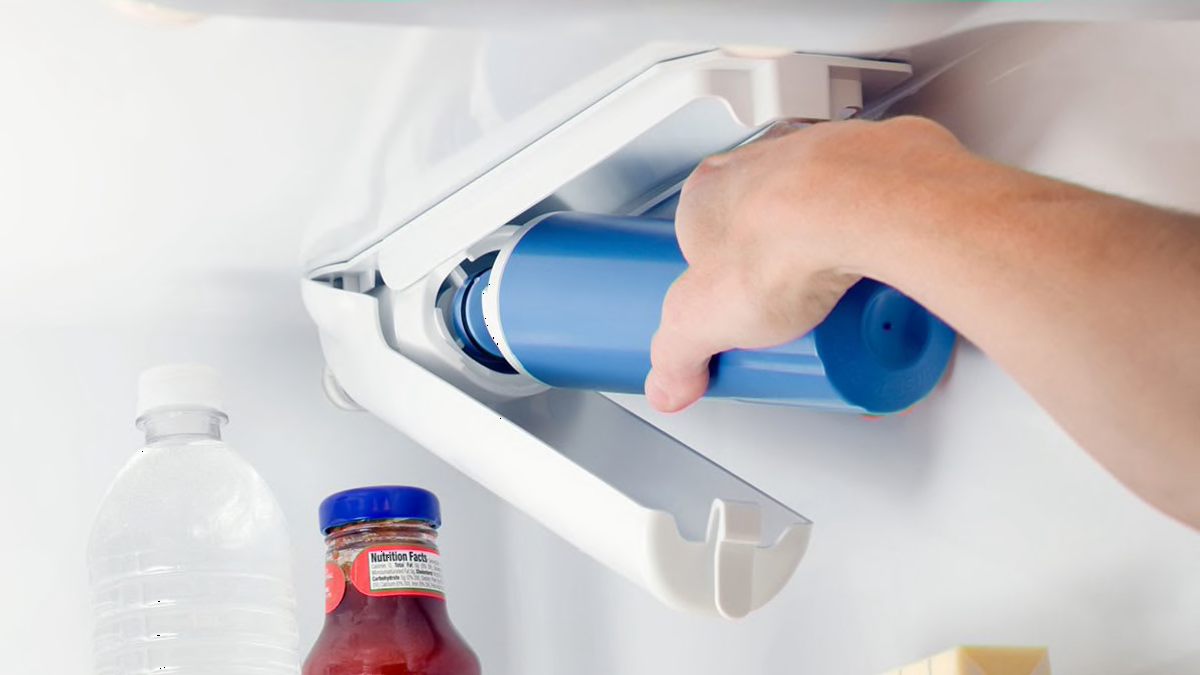
Credit: www.consumerreports.org
Flush The New Filter
Flushing the new water filter is a crucial step after installation. It ensures that any loose carbon particles or impurities are cleared out before you start using the filtered water. Skipping this step can result in a strange taste or cloudy water, which nobody wants.
Why You Should Flush The New Filter
New filters often contain carbon dust that can make your water look dark or taste odd. Flushing pushes this dust out so your water tastes fresh and clean. Have you ever noticed your water tasting funny right after changing the filter? That’s usually why.
How To Flush The Filter Properly
- After installing the filter, run water through the dispenser for about 3 to 5 minutes.
- Use a large container to catch the water during flushing.
- Make sure to flush both cold and filtered water settings if your fridge has separate options.
This process helps clear any trapped air and prepares the filter for optimal use.
What Happens If You Don’t Flush The Filter
Not flushing can lead to a build-up of carbon dust in your water lines. This may cause blockages or reduce water flow over time. Plus, your first few drinks might taste unpleasant, which defeats the purpose of having a new filter.
Tips For A Smooth Flushing Experience
- Keep a towel handy to wipe any spills.
- Flush in a sink area to avoid messes.
- Check your fridge’s manual for recommended flushing duration.
Taking these small steps saves you from frustration and ensures your filter works perfectly from day one.
Troubleshooting Common Issues
Sometimes, resetting a water filter on a GE refrigerator does not go smoothly. Troubleshooting common issues can save time and frustration. Identifying the problem quickly helps maintain clean water and proper fridge function.
Many problems arise from simple mistakes or overlooked steps. Knowing what to check can fix most issues without a technician.
Filter Indicator Not Resetting
The filter indicator may fail to reset after replacement. This often happens because the reset button was not held long enough. Press and hold the reset button for about 3 to 5 seconds until the light changes.
Sometimes, the fridge needs to be unplugged and plugged back in. This can refresh the system and allow the indicator to reset. Check your user manual for the exact reset instructions for your model.
Water Taste Or Odor Problems
New filters can sometimes cause strange tastes or odors. This usually clears after running several gallons of water through the system. Flush the water dispenser for 3 to 5 minutes to remove trapped air and loose carbon particles.
If the problem continues, check the filter installation. A loose or damaged filter can cause water to bypass the filter, affecting taste and odor.
Leaks Or Drips After Replacement
Leaks or drips often result from improper filter installation. Make sure the filter is securely locked in place. Inspect the O-ring for damage or dirt, and replace it if needed.
Leaks can also come from cracked filter housing or water lines. Examine these parts closely. Tighten any loose connections, but avoid overtightening, which can cause damage.

Credit: www.youtube.com

Credit: www.haierappliances.com
Frequently Asked Questions
How Do I Reset The Water Filter On A Ge Refrigerator?
To reset the water filter, press and hold the reset button for 3 seconds. The filter indicator light will turn off, signaling a successful reset.
When Should I Reset The Ge Refrigerator Water Filter?
Reset the water filter indicator after installing a new filter. This keeps your water fresh and ensures accurate filter life tracking.
What If The Water Filter Reset Button Doesn’t Work?
Try unplugging the fridge for 5 minutes, then plug it back in. If the reset still fails, consult your GE refrigerator manual or customer support.
Can I Use Any Water Filter To Reset The Ge Fridge?
No, use only GE-approved water filters. Using non-approved filters can cause improper reset and affect water quality.
Conclusion
Resetting the water filter on your GE refrigerator keeps water fresh and clean. Follow the steps carefully to avoid mistakes. A quick reset saves time and effort. Regularly changing and resetting the filter helps your fridge work well. Clean water tastes better and is healthier to drink.
Keep your fridge’s filter reset for best results. Simple steps make the process easy for anyone. Now, enjoy fresh water every day without trouble.