Is your GE Profile bottom freezer making strange noises or not cooling properly? The evaporator fan motor might be the culprit.
Knowing how to replace this part can save you time and money on repairs. In this guide, you’ll find clear, step-by-step instructions to help you fix your freezer quickly and confidently. Keep reading to learn how to bring your fridge back to perfect working order without calling a technician.
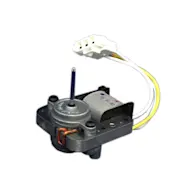
Credit: www.searspartsdirect.com
Signs Of A Faulty Evaporator Fan Motor
Knowing the signs of a faulty evaporator fan motor helps prevent bigger fridge problems. This motor moves cold air inside the freezer. It keeps the temperature even and stops ice from building up. When the motor fails, the freezer stops working properly. Early detection saves time and money.
Unusual Noises
Strange sounds often mean the fan motor has issues. Listen for grinding, buzzing, or rattling noises inside the freezer. These sounds happen when the fan blades hit ice or the motor bearings wear out. A healthy motor runs quietly and smoothly.
Temperature Issues
A broken fan motor causes uneven cooling inside the freezer. Some areas may get too warm while others stay cold. Food can spoil faster if the temperature does not stay steady. Check if your freezer is warmer than usual or if frost melts quickly.
Frost Buildup
Excess frost around the freezer walls or fan means poor airflow. The fan motor moves air to stop frost from forming. If the motor fails, moisture freezes and builds up on surfaces. This frost blocks air vents and worsens cooling problems.
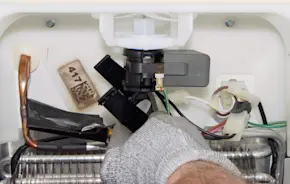
Credit: www.searspartsdirect.com
Tools And Materials Needed
Before you start replacing the evaporator fan motor in your GE Profile bottom freezer, gathering the right tools and materials is crucial. Having everything on hand makes the repair smoother and prevents unnecessary delays. You’ll want to be prepared with both basic tools and the exact replacement parts.
Basic Tools
These are the essential tools you’ll need to tackle the job safely and efficiently:
- Screwdrivers:Both Phillips and flathead screwdrivers will help you remove panels and screws.
- Nut driver or socket set:Some screws or bolts require these for loosening and tightening.
- Multimeter:Use this to test the electrical connections and confirm the motor is faulty before replacing.
- Pliers:Needle-nose pliers help with disconnecting wiring connectors and handling small parts.
- Flashlight:You’ll need good lighting inside the freezer compartment to see all components clearly.
Having these tools ready saves you from running back and forth. Have you ever started a repair only to realize you’re missing a screwdriver? It’s frustrating and avoidable.
Replacement Parts
Choosing the right replacement evaporator fan motor is key to restoring your freezer’s performance. Here’s what to look for:
- Exact model number:Match the motor to your GE Profile freezer model to ensure compatibility.
- OEM vs. aftermarket parts:Original Equipment Manufacturer parts usually guarantee better fit and durability.
- Additional items:Sometimes, it’s smart to replace the mounting screws or wiring harness if they show wear.
Ordering the correct motor upfront saves you from repeated repairs. Have you checked your freezer’s manual or label for the exact part number? It’s a small step that makes a big difference.
Safety Precautions
Replacing the evaporator fan motor in a GE Profile bottom freezer requires careful attention to safety. Taking proper precautions protects you from electrical hazards and injury. Safety should be your top priority before starting any repair work.
Power Disconnection
Always unplug the refrigerator before beginning any repair. This stops electricity flow and prevents shocks. Do not rely on just turning off the circuit breaker. Physically disconnect the power cord from the wall socket. Confirm the appliance is completely off by testing with a voltage meter if available.
Handling Electrical Components
Wear insulated gloves when touching wires or terminals. Avoid working in wet or damp conditions. Keep metal tools away from electrical contacts to prevent short circuits. Handle all wiring carefully to avoid damaging insulation. Secure loose wires to prevent accidental contact or pulling.
Accessing The Evaporator Fan Motor
Access the evaporator fan motor by first unplugging the refrigerator for safety. Remove the back panel inside the freezer to reach the motor easily.
Accessing the evaporator fan motor in your GE Profile Bottom Freezer can seem daunting, but with a little guidance, it becomes manageable. This task involves a few steps that require attention to detail and patience. With the right approach, you'll be able to reach and replace the fan motor without any hassle.
Removing The Bottom Freezer Drawer
Start by clearing out your freezer. Emptying the contents not only makes the drawer lighter but also gives you space to work. Once empty, locate the screws or clips that hold the drawer in place. These are typically found on the sides or bottom of the drawer. Carefully remove these fasteners. As you do this, remember to keep them safe for reassembly. With the fasteners removed, gently slide the drawer out. If it feels stuck, double-check for any remaining screws or clips.
Taking Off The Rear Panel
Now that the drawer is out, it's time to remove the rear panel. This panel acts as a barrier, protecting the fan motor. Using a screwdriver, unscrew the panel's fasteners. These screws are usually located at the panel's corners. Once the screws are out, carefully pull the panel away. Be mindful not to force it, as it might be clipped in place. With the rear panel removed, the evaporator fan motor is now accessible. At this point, you can inspect it for any visible issues. Ever wondered how small components like a fan motor can impact the whole system? By accessing and replacing it, you ensure your freezer runs efficiently. Ready to tackle the replacement? You'll find that accessing the evaporator fan motor is the first step towards a fully functional freezer.
Removing The Old Fan Motor
Removing the old evaporator fan motor in your GE Profile bottom freezer is a crucial part of the replacement process. It requires careful handling to avoid damaging the delicate components inside the freezer. Taking your time and following clear steps will make this task smoother and help you avoid unnecessary repairs.
Disconnecting Wiring
First, ensure the refrigerator is unplugged to prevent electrical shocks. Locate the wiring harness connected to the fan motor and gently disconnect it. Sometimes the connectors can be tight or stuck due to dust or frost, so use a small tool like a flathead screwdriver to carefully release the clip.
Have you noticed any signs of wear or corrosion on the wiring? If yes, take a moment to clean or replace those wires before proceeding. This little check can save you headaches later on.
Unscrewing The Motor
Once the wiring is disconnected, look for the screws holding the motor in place. Typically, these are Phillips-head screws, so having a good screwdriver on hand is essential. Remove each screw carefully and keep them in a safe place—you’ll need them to install the new motor.
Sometimes the motor might be stuck due to accumulated ice or dirt. If you find it hard to remove, try gently wiggling it free without using excessive force. Patience here protects the surrounding parts from damage.
Installing The New Fan Motor
Installing the new evaporator fan motor in your GE Profile bottom freezer requires careful handling. This part moves cold air through the freezer, keeping everything fresh. Proper installation ensures your freezer works efficiently and quietly. Follow these steps to position the motor and reconnect the wiring safely.
Positioning The Motor
Place the new fan motor exactly where the old one was removed. Align the mounting holes on the motor with the slots on the freezer wall. Make sure the fan blades have enough space to spin freely. Avoid forcing the motor into position to prevent damage. Use screws to secure the motor firmly. Check that the motor sits level to avoid noise and vibration.
Reconnecting Wiring
Match the wires from the freezer to the motor terminals by color. Connect each wire securely to ensure proper power flow. Use a screwdriver to tighten any terminal screws if needed. Avoid loose connections to prevent electrical issues. Double-check that no wires are pinched or touching metal parts. After wiring, test the motor by briefly powering on the freezer.
Reassembling The Freezer
Reassembling the freezer after replacing the evaporator fan motor is a crucial step to ensure your GE Profile bottom freezer works smoothly. Taking your time here helps avoid any damage and ensures everything fits back perfectly. Let’s go through the key parts you’ll need to handle carefully during reassembly.
Replacing The Rear Panel
The rear panel protects important components and keeps cold air circulating properly. Carefully align the panel back into its original position before securing it with screws. Double-check that no wires are pinched or out of place, as this can cause issues later.
Sometimes, the panel might feel tight or tricky to fit, especially if clips are involved. Don’t force it; instead, verify that all internal parts are correctly positioned. Have you noticed any bent tabs or connectors that might block the panel? Fixing these will save you trouble down the road.
Sliding The Drawer Back
Sliding the freezer drawer back in seems simple, but it requires precision to avoid damage. Gently guide the drawer along the tracks, ensuring it moves smoothly without resistance. If you encounter stiffness, check if any cables or components are caught under the drawer.
Once the drawer is fully in place, open and close it a few times to confirm it’s aligned properly. Smooth operation means you’ve reassembled it right. Have you ever experienced a drawer that won’t close properly after repairs? It’s often due to missed alignment during reassembly, so take your time here.
Testing The New Motor
Testing the new evaporator fan motor is key to ensure your GE Profile bottom freezer works well. This step confirms the motor runs smoothly and cools efficiently. It helps catch any issues before putting everything back together.
Follow these simple checks to verify the motor’s operation. These tests are quick but important for your fridge’s performance and longevity.
Powering On
First, reconnect the power supply to the refrigerator. Make sure the motor wires are secure and insulated. Turn on the fridge and watch for any immediate signs of power.
The motor should start running without delays or sparks. If the motor stays silent, double-check your connections. Use a multimeter to test the voltage at the motor terminals. The correct voltage means the motor receives power.
Listening For Proper Operation
Listen closely to the motor’s sound. A smooth, steady hum means it works correctly. Any grinding, rattling, or clicking noises show problems.
Check the airflow inside the freezer. The fan should blow air consistently and quietly. Weak airflow or strange sounds could mean a bad motor or installation error.
Stop the motor and try spinning the fan blade by hand. It should move freely without resistance. This test helps find obstructions or damaged bearings.
Maintenance Tips For Longevity
Replacing the evaporator fan motor in a GE Profile bottom freezer keeps your fridge running smoothly. Regular maintenance prevents breakdowns and extends appliance life. Clean and inspect parts to ensure optimal performance and avoid costly repairs.
Maintaining your GE Profile bottom freezer in tip-top condition requires some regular attention, especially when it involves crucial components like the evaporator fan motor. By following simple maintenance tips, you can enhance the longevity of your appliance, ensuring it performs efficiently for years. Let's dive into some straightforward strategies you can implement today.
Regular Cleaning
Regular cleaning is vital for the optimal performance of your freezer. Dust and debris can accumulate around the fan motor, causing it to work harder than necessary. Make it a habit to clean the coils and fan area at least twice a year. Use a vacuum or a soft brush to gently remove dust and dirt. Keeping the motor area clean not only helps in maintaining its efficiency but also prolongs the life of the appliance. Have you ever noticed how a clean space just feels better? The same goes for your freezer's motor.
Avoiding Overloading
Overloading your freezer can strain the evaporator fan motor, leading to premature wear and tear. Always leave some space for air circulation inside the freezer. When you pack your freezer to its brim, you restrict airflow, forcing the motor to work overtime. Think of it like trying to breathe in a crowded room—it's not comfortable. Keep in mind, a well-organized freezer is not only easier to navigate but also less taxing on your appliance. Are you using your freezer space wisely? Consider rearranging to allow for better airflow and prevent overloading.

Credit: www.searspartsdirect.com
Frequently Asked Questions
How Do I Know If The Evaporator Fan Motor Is Bad?
If your freezer is warm or noisy, the evaporator fan motor may be faulty. Check for unusual sounds or ice buildup. A non-spinning fan indicates a motor issue needing replacement.
What Tools Are Needed To Replace The Fan Motor?
You will need a screwdriver, nut driver, multimeter, and possibly pliers. These tools help remove panels, test the motor, and disconnect wiring safely.
How Long Does It Take To Replace The Fan Motor?
Replacing the evaporator fan motor typically takes 30 to 60 minutes. Time varies with experience and model accessibility but is generally a straightforward task.
Can I Replace The Motor Without Unplugging The Fridge?
No, always unplug the refrigerator before starting. This prevents electrical shock and protects you from injury during the repair process.
Conclusion
Replacing the evaporator fan motor in your GE Profile bottom freezer is simple with the right steps. Take your time and follow each instruction carefully. This repair helps your fridge run smoothly and keeps food fresh longer. Remember to unplug the appliance before starting work.
Use basic tools and stay safe throughout the process. A working fan motor means better cooling and less noise. You can handle this task yourself with patience and care. Keep your fridge in good shape by fixing small problems early.