If you want clean, fresh-tasting water from your Frigidaire Gallery refrigerator, changing the water filter regularly is a must. But maybe you’re wondering how to do it quickly and without any hassle.
Don’t worry—you’re in the right place. This guide will walk you through each simple step, so you can keep your water pure and your fridge running smoothly. Stick with me, and you’ll have that filter replaced in no time!
Locate The Water Filter
Knowing where your Frigidaire Gallery refrigerator’s water filter is located is the first step to replacing it. The filter ensures clean, fresh water and ice. Finding it quickly saves time and avoids frustration.
The water filter is usually easy to access. It sits inside the refrigerator or at the base. Identifying the exact spot helps prepare for a smooth filter change.
Find The Filter Housing
The filter housing holds the water filter in place. Look inside the refrigerator, near the top right corner or bottom grille. Some models have the filter inside the fresh food compartment, behind a cover.
The filter housing can be a small rectangular or cylindrical compartment. It often has a twist-off cap or a push-in slot. Check the user manual for your model if needed.
Identify Filter Model
Each Frigidaire Gallery refrigerator uses a specific filter model. The model number is usually printed on the filter or the housing. Common models include ULTRAWF, WF3CB, or WF2CB.
Knowing the model helps buy the correct replacement. Write down or take a photo of the number before removing the filter. This step ensures you get the right fit and function.
Prepare For Replacement
Preparing for a water filter replacement on your Frigidaire Gallery refrigerator makes the process smoother. It helps avoid mistakes and saves time. Proper preparation ensures clean water and fresh taste after installation.
Gather Necessary Tools
Collect all tools before starting. This avoids interruptions during the replacement. You need:
- New water filter compatible with Frigidaire Gallery model
- Soft cloth or towel to catch drips
- Bucket or small container for water spills
- Flashlight if the filter area is dark
Check the user manual for any model-specific tools. Having everything ready makes the task easy and quick.
Turn Off Water Supply
Stop water flow to the refrigerator before removing the old filter. This prevents leaks and water damage. Locate the shut-off valve behind or under the fridge. Turn it clockwise to close it.
After closing the valve, open the water dispenser briefly. This releases pressure and stops water flow inside the filter area. It helps avoid spills when removing the filter.
Remove The Old Filter
Removing the old water filter from your Frigidaire Gallery refrigerator is a straightforward task that sets the stage for clean, fresh water. It requires a bit of care to avoid spills and damage. Let’s break down how to get that old filter out safely and efficiently.
Release Filter Lock
Start by locating the filter lock, usually found inside the fridge compartment or near the water dispenser. This lock keeps the filter securely in place, so releasing it is essential before pulling the filter out.
Depending on your model, you might need to twist the filter counterclockwise or press a release button. If you’re unsure, consult your refrigerator’s manual or look for a small arrow indicating the direction to turn. Have you noticed how some filters feel stuck? Applying gentle pressure often helps without risking damage.
Extract Filter Carefully
Once the lock is released, grasp the filter firmly but gently. Pull it straight out to avoid bending or breaking any parts. Sudden yanks can cause leaks or damage the filter housing.
Keep a towel handy to catch any water that might drip during removal. If the filter feels resistant, double-check that the lock is fully disengaged. Your goal is a smooth, controlled extraction to prepare for installing the new filter.
Install The New Filter
Installing the new water filter in your Frigidaire Gallery refrigerator is simple. Proper installation ensures clean, fresh water and ice. Follow these steps to fit the new filter correctly.
Align And Insert Filter
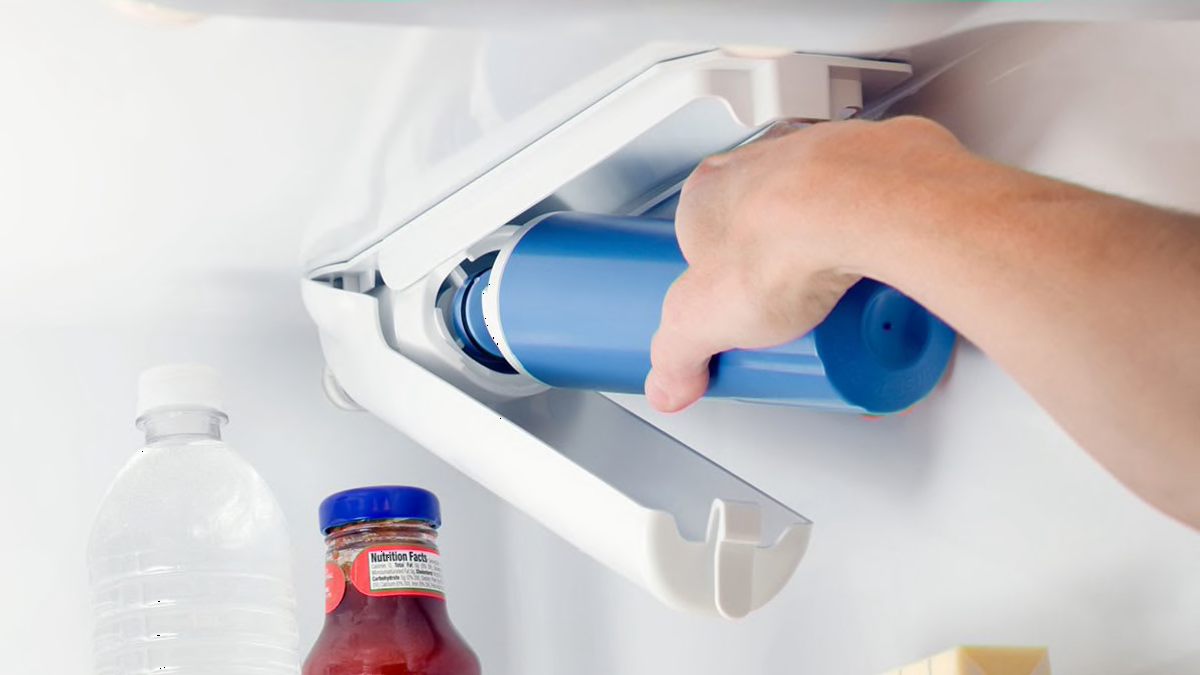
Check the new filter for any protective caps. Remove these caps before installation. Hold the filter so the arrows or markings face the correct direction. Align the filter with the filter housing inside the fridge. Push the filter straight into the housing gently but firmly. Do not force it. It should slide in easily if aligned well.
Secure Filter In Place
After inserting, turn the filter clockwise until it locks. You will hear a click or feel resistance. This means the filter is secure and sealed. Wipe around the filter area with a clean cloth to remove any water drops. Close the filter cover or door if your model has one. Run water from the dispenser for a few minutes to clear air and impurities.
Reset The Filter Indicator
Resetting the filter indicator on your Frigidaire Gallery refrigerator is a crucial step after changing the water filter. This simple action ensures the filter status light accurately reflects the new filter's condition. Ignoring this reset can lead to confusion about when the next filter change is due.
Locate Reset Button
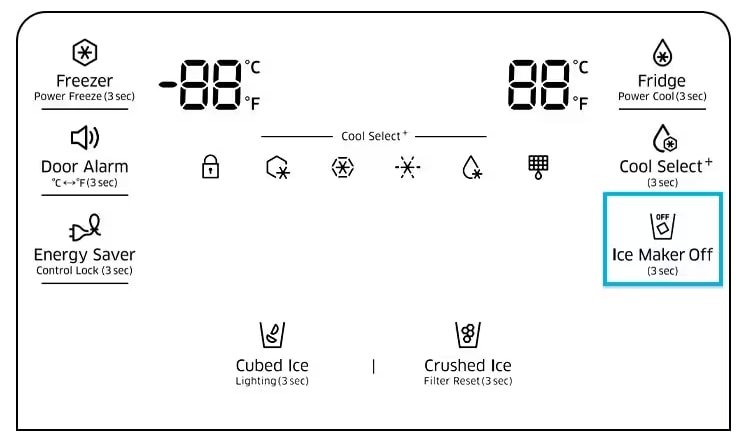
Start by finding the reset button on your refrigerator. Usually, it is located on the control panel, near the water filter indicator light. The button might be labeled "Reset" or represented by a small icon resembling a water drop or filter.
If you have trouble spotting it, check your user manual or look for a small, recessed button that requires a pointed object to press. Knowing exactly where this button is saves you time and prevents frustration.
Perform Reset Procedure
Once you've located the reset button, press and hold it for about 3 to 5 seconds. You will notice the filter indicator light blinking or turning off, signaling that the reset is successful.
Some models may require you to press the button twice or hold it a little longer. If the indicator doesn't reset, try repeating the process or consult the manual for model-specific instructions.
Have you ever ignored this step and wondered why the filter light stayed on? Resetting the indicator not only clears the alert but also helps you keep track of your filter changes accurately, ensuring your water stays clean and fresh.

Credit: www.youtube.com
Flush The New Filter
Changing the water filter on a Frigidaire Gallery Refrigerator ensures clean, fresh water. Remove the old filter by twisting it counterclockwise. Insert the new filter, twist it clockwise until secure, and flush it with water to remove air bubbles.
Flushing the new water filter in your Frigidaire Gallery Refrigerator is an essential step to ensure the water you consume is clean and free from any manufacturing residues. It might seem like a small detail, but skipping this step can lead to an unpleasant taste in your water or ice. Remember, the objective is to improve the quality of your drinking water, not compromise it.
Run Water Through Filter
Begin by running water through the new filter to remove any trapped air and impurities that may be present from the manufacturing process. Simply place a container under the water dispenser and allow the water to run for about five minutes. This might seem like a lot of water, but it's crucial for ensuring the filter is clean and ready for use. Why is this step important? The initial water flow might contain carbon particles, which are harmless but can give your water a cloudy appearance. Running water for a few minutes helps clear these particles out.
Check For Leaks
After flushing the filter, it's essential to check for any leaks. A leak could indicate an improper installation or a faulty filter. To check, inspect the area around the filter and the water dispenser for any signs of water. If you notice any leaks, don't panic. Try removing the filter and reinstalling it, ensuring it's tightly secured. If the leak persists, you might need a replacement filter. Isn't it reassuring to know that addressing this promptly prevents potential water damage? Regularly checking for leaks ensures that your refrigerator operates efficiently and extends the lifespan of your appliance. Remember, a small leak today could become a bigger problem tomorrow.
Maintenance Tips
Keeping your Frigidaire Gallery refrigerator’s water filter in top shape is key to enjoying fresh, clean water every day. Regular maintenance not only improves water taste but also protects your appliance from potential damage. Let’s dive into some practical tips to help you know exactly when and why you should replace your water filter.
When To Replace Filter
Water filters don’t last forever. The general rule is to replace your filter every 6 months, but this can vary based on your water usage and quality.
- If your household uses a lot of water daily, consider changing the filter more often.
- Check your refrigerator’s manual for the recommended replacement schedule.
- Some models have an indicator light that signals when it’s time to replace the filter. Pay attention to that—it’s there to help you.
I once ignored the replacement schedule because the water still looked clear. But soon after, the taste changed, and the filter light came on. Changing the filter promptly solved the problem and reminded me not to delay next time.
Signs Of Filter Issues
How do you know your filter isn’t working well? Watch for these signs:
- Unusual taste or odor:If the water tastes strange or smells off, your filter may be clogged or failing.
- Slow water flow:A significant drop in water pressure often means the filter is blocked.
- Cloudy or discolored water:This indicates the filter isn’t removing impurities effectively.
Have you noticed any of these signs but hesitated to replace the filter? Acting quickly can prevent bigger issues like leaks or damage to your refrigerator’s internal systems.
Credit: www.consumerreports.org

Credit: www.searshomeservices.com
Frequently Asked Questions
How Often Should I Change Frigidaire Gallery Water Filter?
Change the water filter every 6 months or when the indicator light turns on. This ensures clean, fresh water and optimal refrigerator performance.
Where Is The Water Filter Located On Frigidaire Gallery?
The water filter is usually inside the fridge compartment, at the top right or bottom grille. Check your manual for exact location.
How Do I Reset The Water Filter Indicator Light?
After replacing the filter, press and hold the reset button for 3 seconds. The indicator light will turn off, confirming the reset.
What Type Of Water Filter Fits Frigidaire Gallery?
Use only Frigidaire-approved water filters, like the PureSource 3 or equivalent models. This guarantees compatibility and clean water quality.
Conclusion
Changing the water filter in your Frigidaire Gallery refrigerator keeps water clean and fresh. Follow the steps carefully to avoid mistakes. Replace the filter every six months for best results. Clean water helps your health and improves taste. Taking a few minutes now saves trouble later.
Keep your fridge working well with regular filter changes. Simple and quick tasks like this protect your family’s drinking water. You will enjoy clearer, better-tasting water every day.