Is your Frigidaire Gallery refrigerator not tasting as fresh as it used to? Changing the water filter is the simple fix that can make a big difference in the quality of your drinking water.
But if you’re unsure how to do it, don’t worry—you’re in the right place. In this guide, you’ll learn step-by-step how to change your water filter quickly and easily. By the end, you’ll feel confident keeping your fridge’s water clean and refreshing.
Keep reading to find out how!
Tools And Supplies Needed
Changing the water filter in a Frigidaire Gallery refrigerator requires a few simple tools and supplies. Having these ready will make the process quick and easy. You do not need many items, just the essentials to replace the filter safely.
Gathering the right tools prevents damage to the refrigerator parts. It also ensures the new filter fits well and works properly. Keep everything close before starting the replacement.
Replacement Water Filter
- Use the exact model designed for your Frigidaire Gallery.
- Check the filter number in your user manual or on the old filter.
- Buy a genuine or certified replacement for best results.
Soft Cloth Or Towel
- Protect surfaces from water spills during the change.
- Use it to dry the filter area after removal.
- Keep it handy to wipe your hands.
Gloves (optional)
- Help keep hands clean and dry.
- Protect skin from cold water or sharp edges.
Small Container Or Bowl
- Catch any dripping water from the old filter.
- Prevent water from spilling inside the fridge or on the floor.
Locating The Water Filter
Finding the water filter in your Frigidaire Gallery refrigerator might seem tricky at first. Knowing exactly where it’s located makes the replacement process much smoother. Let’s pinpoint the spot together so you can change the filter without frustration.
Inside The Refrigerator Compartment
Most Frigidaire Gallery models house the water filter inside the fridge compartment, usually near the top right corner. Open your fridge and look up high along the back or side walls. You’ll often see a small, cylindrical filter cartridge tucked away in a recessed slot.
This location keeps the filter accessible but out of the way of your groceries. Have you checked behind the crisper drawer or near the top light panel? Sometimes, the filter is hidden behind a removable cover you can gently pull off.
In The Base Grille Or Kick Plate
Some models place the water filter outside the fridge, in the lower grille or kick plate area. This spot is near the floor, just beneath the main door. Look for a small door or panel that you can open or pop off to reveal the filter.
This position can make filter changes easier if you prefer not to reach inside the fridge. If you haven’t checked the base yet, give it a try—you might be surprised at how convenient this setup is.
Consulting The User Manual Or Model Information
If you’re unsure where to look, the user manual is a great guide. It shows exact filter locations with clear diagrams tailored to your specific Frigidaire Gallery model. You can usually find your manual online if you don’t have a physical copy.
Knowing your model number is key here. Have you noticed it on the inside wall or door frame of your fridge? Once you have that, a quick search can pinpoint your filter’s exact position and save you time.
Removing The Old Filter
Removing the old water filter from your Frigidaire Gallery refrigerator is a simple task. It prepares the system for a fresh filter, ensuring clean water and ice. Knowing the right steps helps avoid damage and keeps your fridge working well.
Before starting, locate the filter inside the fridge. Most models have it in the upper right corner or behind a grille. Make sure the fridge door is open and the area is clear for easy access.
Turn Off The Water Supply
Stop water flow to prevent leaks while removing the filter. Find the water valve behind the fridge or under the sink. Turn it clockwise to close the valve.
Release The Filter
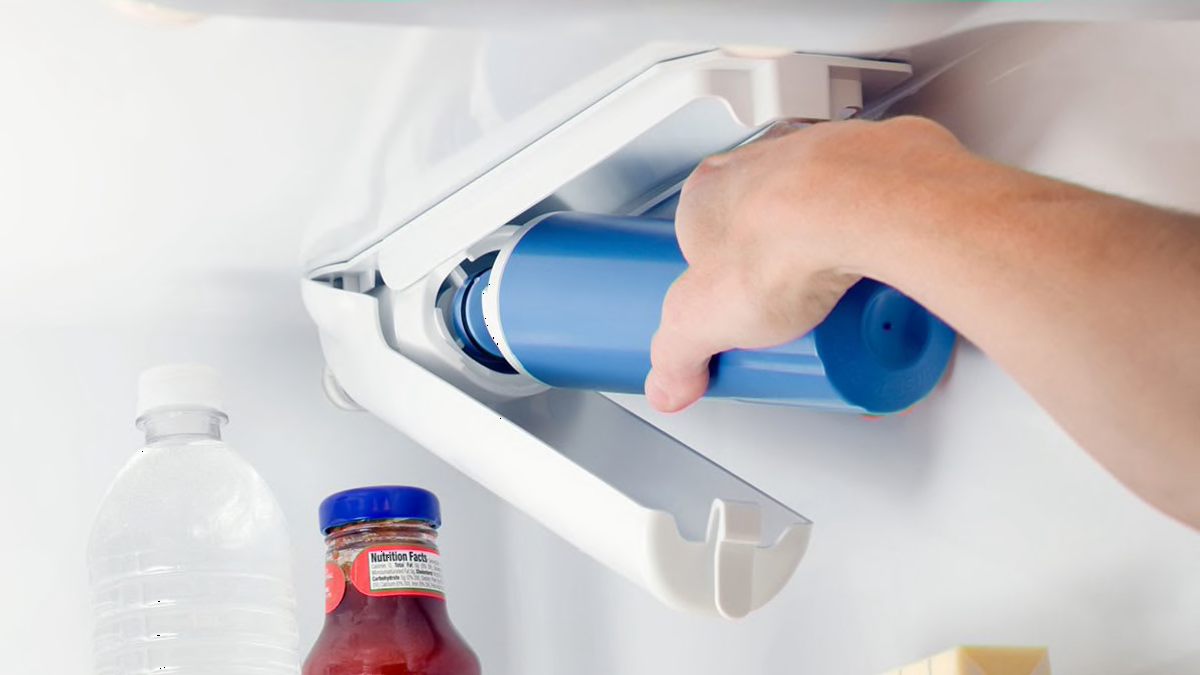
Press the release button near the filter or twist the filter counterclockwise. This action loosens the filter from its housing. Pull the filter straight out gently to avoid spills.
Dispose Of The Old Filter Properly
Put the old filter in a plastic bag to catch any drips. Dispose of it according to local recycling rules. Do not throw it directly into the trash if recycling is available.
Installing The New Filter
Installing the new filter in your Frigidaire Gallery refrigerator is a simple task that ensures your water stays fresh and clean. It’s important to handle this step carefully to avoid leaks or improper filtration. Let’s walk through the process to make it smooth and hassle-free.
Locate The Filter Compartment
First, find the filter compartment inside your refrigerator. It’s usually located in the upper right corner or inside the grille at the bottom. Knowing exactly where it is helps you avoid fumbling around and saves time.
Prepare The New Filter
Before installing, remove any protective covers or caps from the new filter. Make sure the O-rings are in place and not damaged. These small details can affect the seal and lead to leaks if overlooked.
Insert The Filter
Line up the new filter with the slot carefully. Push it in firmly until it clicks or locks into place. You’ll feel when it’s secure—don’t force it, but don’t hesitate to apply steady pressure.
Reset The Filter Indicator
After installing, reset the filter indicator light to keep track of your filter’s lifespan. Usually, this involves pressing and holding a button on the control panel for a few seconds. Have you ever ignored this step? It can lead to using an expired filter and compromised water quality.
Run Water To Clear Air And Impurities
Run cold water through the dispenser for a few minutes to clear any air or loose carbon particles from the new filter. This step improves taste and prevents sputtering. It’s a small action that ensures your first glass of water is as pure as it should be.
Checking For Leaks
Checking for leaks is an important part of changing the water filter in your Frigidaire Gallery refrigerator. A small leak can cause water damage and reduce the efficiency of your appliance. After replacing the filter, it is essential to make sure everything is sealed properly and working well.
Leaks usually happen around the filter housing or the water line connections. Detecting these leaks early can save you from costly repairs and messy cleanup. It only takes a few minutes to inspect and fix any issues.
Inspecting The Filter Area
Start by looking closely at the filter area. Check for any water drops or wet spots. Use a dry cloth to wipe the area and see if it gets wet again. A steady drip means a leak is present.
Checking Water Line Connections
Look at the water lines connected to the filter. Ensure the connections are tight but not over-tightened. Loose fittings can cause leaks. Use your hand to gently test the fittings for any movement.
Running The Water After Replacement
Turn on the water supply and run the water dispenser for a few minutes. This action helps clear air from the lines and tests the filter seal. Watch closely for any signs of dripping or pooling water.
Using Paper Towel To Detect Leaks
Place a dry paper towel under the filter and connections. The paper towel will quickly show any leaks by getting wet. Replace the towel if needed and monitor for a few minutes to be sure.
What To Do If You Find A Leak
- Turn off the water supply immediately.
- Check the filter installation and remove it carefully.
- Inspect the O-ring or gasket for damage or dirt.
- Reinstall the filter, making sure it clicks into place.
- Tighten the water line fittings carefully without forcing them.
- Turn the water back on and recheck for leaks.
Credit: www.consumerreports.org
Resetting The Filter Indicator
The filter indicator on a Frigidaire Gallery refrigerator shows when the water filter needs changing. After replacing the filter, reset the indicator to keep it accurate. This helps maintain clean water and ice quality.
Resetting the filter indicator is simple and quick. It ensures the refrigerator tracks the new filter’s usage correctly. Without resetting, the indicator might show the wrong status.
Locate The Filter Reset Button
Find the filter reset button on the refrigerator’s control panel. It is often near the water dispenser controls or inside the fridge door.
Press And Hold The Reset Button
Press the reset button firmly. Hold it for about 3 to 5 seconds. The indicator light will start to blink or turn off, signaling the reset.
Confirm The Indicator Is Reset
Check the filter indicator light after resetting. It should turn off or show a green light. This confirms the reset worked correctly.
When To Reset The Filter Indicator
- After installing a new water filter
- When the indicator light stays on after replacement
- To keep the filter status accurate for clean water
Tips For Maintenance
Maintaining your Frigidaire Gallery refrigerator's water filter is key for clean, fresh water. Proper care helps the filter last longer and keeps water tasting good. Follow these simple tips to keep your filter and fridge in top shape.
Regular Filter Replacement
Change the water filter every six months or as recommended. Old filters clog and reduce water flow. Fresh filters trap more impurities and keep water clear.
Clean The Filter Housing
Wipe the filter area with a damp cloth during each replacement. Dirt and debris can build up, affecting filter performance. Keep the space clean for better water quality.
Flush The New Filter
After installing a new filter, run water for a few minutes. This clears air and loose carbon particles. Flushing ensures better taste and proper function.
Check For Leaks
Inspect the filter and surrounding area for leaks after installation. A tight fit prevents water damage and maintains pressure. Fix any leaks immediately to avoid problems.
Monitor Water Taste And Flow
Notice any changes in taste or slow water flow. These signs indicate the filter needs replacing or checking. Regular monitoring helps catch issues early.

Credit: www.youtube.com

Credit: www.searshomeservices.com
Frequently Asked Questions
How Often Should I Change Frigidaire Water Filter?
Change the Frigidaire water filter every 6 months or after filtering 200 gallons. Regular replacement ensures clean, fresh-tasting water and optimal refrigerator performance.
How Do I Locate The Water Filter In Frigidaire Gallery?
The water filter is usually in the upper right corner inside the refrigerator or at the base grille. Check your user manual for exact location.
What Type Of Filter Fits Frigidaire Gallery Refrigerators?
Use Frigidaire Genuine water filters like ULTRAWF or WF3CB. Using the correct filter ensures proper fit and effective water filtration.
Can I Reset The Water Filter Indicator Light?
Yes, after replacing the filter, press and hold the reset button on the control panel for 3 seconds. This clears the indicator light.
Conclusion
Changing the water filter in your Frigidaire Gallery refrigerator is simple. Follow the steps carefully for clean, fresh water. Doing this regularly keeps your water tasting good and your fridge working well. No tools or special skills are needed. Just take your time and replace the filter as shown.
Clean water helps your family stay healthy. Keep track of when to change the filter next. This small task saves money on repairs later. You can enjoy fresh water anytime, right from your fridge. Easy and quick—just what you need.