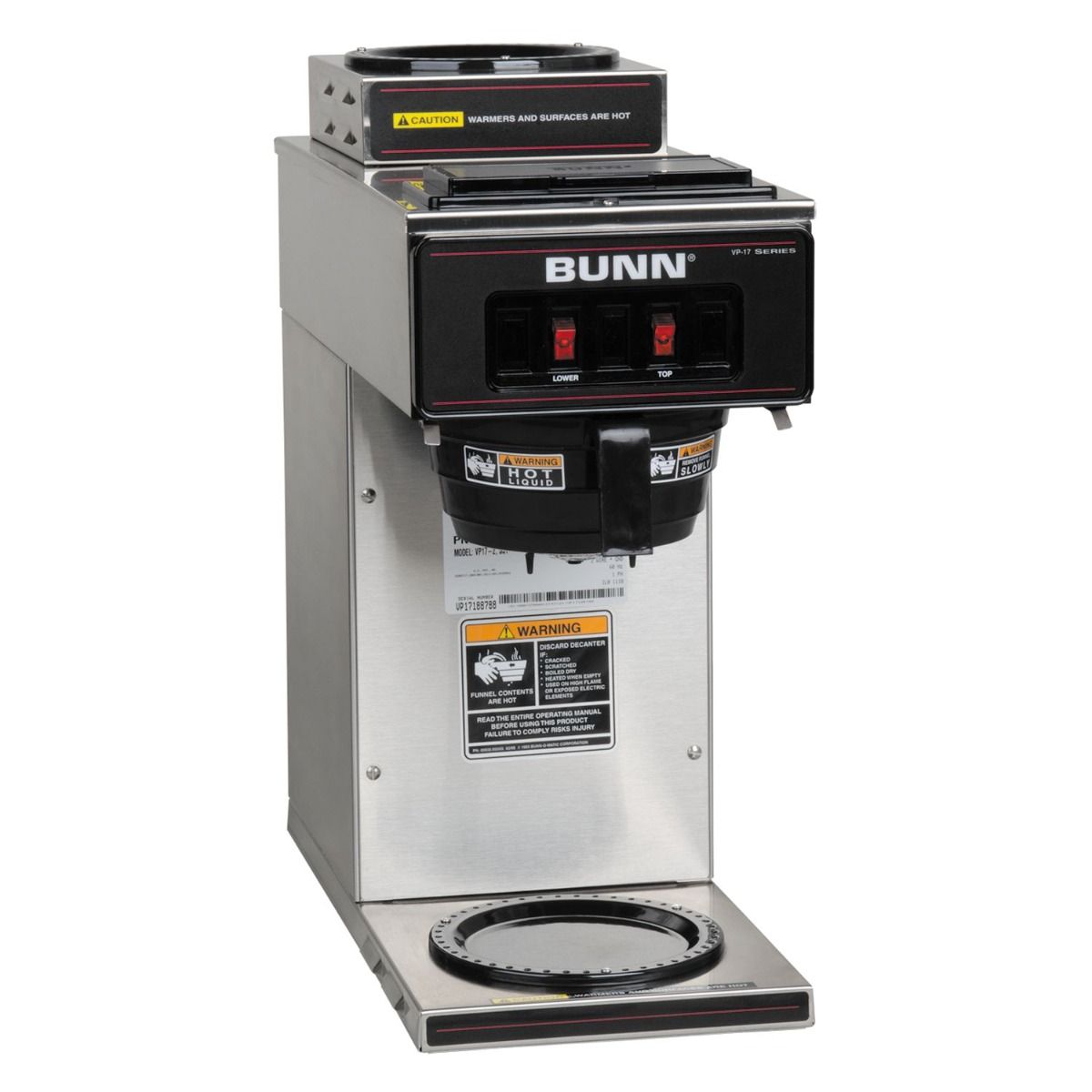
If you rely on your Bunn commercial coffee maker every day, you know how important it is to keep it clean. A clean coffee maker doesn’t just make better-tasting coffee—it also lasts longer and works more efficiently.
But how do you clean it the right way without wasting time or damaging your machine? In this guide, you’ll discover simple, step-by-step tips that anyone can follow. By the end, you’ll feel confident that your coffee maker is spotless and ready to brew perfect cups every time.
Keep reading to learn exactly what you need to do.
Gather Cleaning Supplies
Before you dive into cleaning your Bunn commercial coffee maker, gathering the right supplies is key. Having everything ready makes the process smoother and helps you avoid unnecessary interruptions.
Think about what you’ll need to tackle both the inside and outside of the machine effectively. Do you have all the essentials on hand to get the job done right?
Basic Cleaning Tools
- Soft cloths or sponges:These prevent scratching the machine’s surfaces.
- Brushes:A small brush helps reach tight spots like spray heads and nozzles.
- Measuring cup or container:Useful for mixing cleaning solutions accurately.
Cleaning Solutions
- White vinegar or descaling solution:Removes mineral buildup inside the machine.
- Mild dish soap:Ideal for cleaning external surfaces without damaging finishes.
- Water:For rinsing and diluting solutions.
Additional Items To Consider
- Gloves:Protect your hands from strong cleaning agents.
- Paper towels:Handy for drying and wiping spills.
- Bucket or large container:To catch water and cleaning solution during rinsing.
I once tried cleaning my Bunn without a brush and ended up spending extra time scraping stubborn coffee stains. Having the right tools upfront saves you effort and frustration.
Do you already have these supplies, or will you need to make a quick trip before cleaning? Taking a moment to prepare sets you up for success.

Prepare The Machine
Preparing your Bunn commercial coffee maker before cleaning is essential to get the best results. Taking the time to set up the machine properly prevents damage and ensures thorough cleaning. Let's break down what you need to do to get your coffee maker ready.
Unplug And Cool Down The Machine
Always unplug your coffee maker before starting any cleaning process. This step keeps you safe from electrical hazards. Also, let the machine cool down completely to avoid burns or damage to parts.
Remove And Empty The Coffee Pot And Filter Basket
Take out the coffee pot and empty any leftover coffee. Then, remove the filter basket and discard the used coffee grounds. This clears the way for cleaning and stops old coffee from mixing with fresh brew.
Check And Fill The Water Reservoir
Inspect the water reservoir to make sure it’s empty or has fresh water. If you plan to run a cleaning cycle with water and vinegar, fill it accordingly. Clean water is key to flushing out residue effectively.
Before you start, collect all necessary cleaning materials. You’ll need white vinegar or a descaling solution, warm water, a soft cloth, and a brush if available. Having everything ready saves time and keeps the process smooth.
Clean The Exterior
Cleaning the exterior of your Bunn commercial coffee maker keeps it looking sharp and ensures a hygienic environment around your brewing station. Dirt, coffee stains, and fingerprints can build up quickly, especially in busy settings. Giving attention to the outside surface not only improves the machine’s appearance but also prevents grime from seeping into sensitive parts.
Gather The Right Cleaning Supplies
You don’t need complicated tools to clean the exterior well. A soft cloth, mild detergent, and warm water are usually enough. Avoid harsh chemicals or abrasive sponges that can scratch the surface or damage the finish.
Having a microfiber cloth on hand helps trap dust and oils better than regular towels. You might also want a small brush to reach tight corners or vents.
Wipe Down The Surfaces Carefully
Start by unplugging the coffee maker to avoid any electrical hazards. Dampen your cloth with warm, soapy water and gently wipe all visible surfaces including the sides, front, and control panel.
Pay special attention to areas where coffee spills often occur, such as around the brew basket and the drip tray. Wiping these spots regularly prevents sticky buildup that can be tough to remove later.
Dry And Polish For A Spotless Finish
After cleaning, use a dry cloth to remove any moisture and avoid water spots. Polishing the stainless steel parts with a clean, dry microfiber cloth restores the shine and makes your machine look almost new.
Have you noticed how a gleaming coffee maker invites more use? A well-maintained exterior can boost the overall vibe of your coffee area and even encourage better care habits.
Descale The Coffee Maker
Descale the coffee maker with a vinegar solution to remove mineral build-up. Rinse thoroughly to ensure the best taste. Regular cleaning keeps the machine efficient and coffee flavorful.
Descale the Coffee Maker Coffee lovers know the importance of a clean coffee maker. The flavors are richer, and the aromas more inviting. Descaling is essential to keep your Bunn Commercial Coffee Maker in top shape, ensuring it delivers the perfect brew every time.
Use A Descaling Solution
Begin by selecting a high-quality descaling solution. Make sure it's compatible with your Bunn Coffee Maker. Pour the solution into the water reservoir, following the manufacturer’s instructions for the correct ratio. Using the right descaling solution is crucial. It helps to remove mineral deposits that can affect the taste of your coffee. Have you ever noticed a bitter taste in your coffee? It might be time to descale!
Run A Cleaning Cycle
Once the solution is in, start a brewing cycle without any coffee grounds. This allows the solution to circulate through the machine. Let the cycle complete to effectively break down the mineral buildup. Running a cleaning cycle is like giving your coffee maker a mini spa day. It’s a simple yet effective way to maintain its performance. Have you ever considered how a clean machine might improve your morning routine?
Rinse Thoroughly
After descaling, it's crucial to rinse the coffee maker to remove any residual solution. Fill the reservoir with fresh water and run multiple cycles. This ensures that your next cup of coffee is free from any cleaning solution taste. Rinsing thoroughly might seem like an extra step, but it’s essential for the perfect cup of coffee. Imagine the disappointment of tasting cleaning solution instead of your favorite brew! How many rinse cycles do you usually run to feel confident in your machine's cleanliness? By following these steps, you'll maintain your Bunn Commercial Coffee Maker’s efficiency and prolong its lifespan. Your taste buds will thank you for it.
Clean Brew Funnel And Spray Head
Cleaning the brew funnel and spray head of your Bunn commercial coffee maker is essential for maintaining the quality and taste of your coffee. These parts handle hot water and coffee grounds daily, so buildup can affect performance and flavor. Regular cleaning helps you avoid clogs and uneven water distribution, ensuring every cup is as good as the first.
Remove And Inspect The Brew Funnel
Start by carefully removing the brew funnel from the machine. Look inside for any coffee grounds or residue stuck to the sides. This buildup can block the flow of water and reduce extraction quality.
Use warm water and a mild detergent to wash the funnel thoroughly. Avoid harsh chemicals that could damage the plastic. Rinse well to make sure no soap remains.
Clean The Spray Head Thoroughly
The spray head evenly distributes hot water over the coffee grounds. If it’s clogged, your coffee will taste weak or uneven. Use a small brush or toothpick to clear any blocked holes in the spray head.
Soak the spray head in a vinegar solution for about 10 minutes to dissolve mineral deposits. After soaking, rinse it thoroughly with clean water before reinstalling. This simple step can greatly improve the water flow and coffee flavor.
Reassemble And Test The Coffee Maker
Once the brew funnel and spray head are clean, put them back into place securely. Run a brewing cycle with just water to flush out any remaining residue. Pay attention to the flow and smell of the water as it runs through the machine.
Does the water flow evenly? Is there any unusual smell or taste? These checks help confirm that your cleaning was effective and your coffee maker is ready to deliver great coffee again.
Sanitize The Water Reservoir
Sanitizing the water reservoir of your Bunn commercial coffee maker keeps your coffee fresh and safe. The water reservoir can collect bacteria and mold if not cleaned regularly. A clean reservoir prevents bad tastes and health risks.
Cleaning is simple and takes only a few minutes. Use safe, effective methods to remove germs and buildup. Make sure to rinse well to avoid chemical residue.
Gather Necessary Cleaning Supplies
- White vinegar or a food-safe sanitizer
- Soft cloth or sponge
- Clean water
- Small brush for hard-to-reach spots
Empty And Rinse The Reservoir
Start by turning off the coffee maker. Remove the water reservoir and pour out any leftover water. Rinse it with warm water to remove loose dirt and debris.
Apply Cleaning Solution
Fill the reservoir with a mixture of one part white vinegar and two parts water. This solution helps kill bacteria and dissolve mineral buildup. Let it sit for 15 to 20 minutes.
Scrub The Reservoir Interior
Use a soft cloth or brush to scrub inside the reservoir. Focus on corners and edges where mold can hide. Avoid using abrasive materials that can damage the surface.
Rinse Thoroughly With Clean Water
Empty the vinegar solution. Rinse the reservoir several times with clean water. Make sure no vinegar smell or taste remains. This step is crucial to keep your coffee tasting pure.
Dry And Reassemble
Wipe the reservoir dry with a clean cloth. Leave it open to air dry completely. Once dry, place it back in the coffee maker and fill with fresh water for brewing.
Reassemble And Test
After thoroughly cleaning your Bunn commercial coffee maker, it’s time to put everything back together and make sure it’s working perfectly. This step is crucial because even a small mistake in reassembly can affect the coffee maker’s performance or cause leaks. Taking your time here will save you from troubleshooting problems later.
Check Each Component Before Assembly
Before you start snapping parts back, inspect every piece carefully. Look for cracks or damage that might have been missed earlier. If any gasket or seal looks worn out, consider replacing it to avoid future leaks.
Remember how I once skipped this step and ended up with water leaking everywhere? It was a hassle I could have avoided with a quick check.
Follow The Correct Order Of Reassembly
Put the parts back in the exact order you removed them. Usually, this means starting with the internal water system, then the coffee filter basket, and finally the exterior panels. If you’re unsure, referring to the user manual or a service guide can help.
Don’t force anything into place. Components should fit smoothly. If something feels stuck, double-check alignment instead of applying extra pressure.
Secure All Connections Firmly
Tighten screws and clamps securely but avoid overtightening, which can crack plastic parts. Make sure all water lines and electrical connections are properly attached. Loose fittings can cause leaks or electrical hazards.
Power On And Run A Test Brew
Once assembled, plug in the coffee maker and run a full cycle using just water. This flushes out any cleaning residues and confirms that water flows correctly through the system. Watch closely for leaks or unusual noises.
If the machine brews smoothly and no leaks appear, you’re all set. If you spot issues, turn off the machine and revisit the assembly steps. Sometimes even a small misaligned gasket causes problems.
Evaluate The Taste And Temperature Of The Brew
Finally, brew a pot of coffee to check the taste and temperature. A clean machine should produce coffee that tastes fresh without any off-flavors. If the coffee tastes weird or the temperature is off, it might mean residues remain or there’s an assembly error.
Have you noticed a difference in your coffee after cleaning? Your senses are the best test for a job well done.

Regular Maintenance Tips
Keeping your Bunn commercial coffee maker clean is essential for great-tasting coffee and a longer machine life. Regular maintenance stops buildup and prevents breakdowns that can disrupt your daily routine. Here are practical tips you can apply to keep your coffee maker in top shape.
Daily Cleaning Routine
After each use, rinse the brew funnel and spray head with warm water to remove coffee grounds and oils. Wipe down the exterior surfaces with a damp cloth to keep things tidy.
Empty and clean the warming plate to avoid burnt coffee residue. If you skip this, sticky buildup can affect the flavor and the machine’s performance. A quick daily wipe only takes a minute but makes a big difference.
Monthly Deep Cleaning
Once a month, run a descaling cycle using a Bunn-approved cleaner or a vinegar-water solution to remove mineral deposits inside the machine. Fill the water reservoir with the solution and start a brew cycle without coffee grounds.
After the descaling cycle, run two or three cycles with clean water to rinse out any leftover solution. Don’t forget to clean the spray head and funnel thoroughly during this process—these parts often trap hidden buildup.
Avoiding Common Issues
Pay attention to signs like slow brewing or unusual noises. These often indicate clogging or scale buildup, which can be prevented with regular cleaning.
Use filtered water if possible, to reduce mineral deposits. Also, avoid letting coffee grounds sit too long in the machine; stale grounds can cause blockages and off-flavors.
Have you noticed any changes in your coffee maker’s performance? Catching small problems early with simple maintenance can save you expensive repairs later.
Frequently Asked Questions
How Often Should I Clean A Bunn Commercial Coffee Maker?
Clean your Bunn coffee maker weekly to prevent buildup. Regular cleaning ensures better taste and extends machine life. Follow manufacturer guidelines for specific cleaning intervals.
What Cleaning Products Are Safe For Bunn Coffee Makers?
Use only Bunn-approved cleaning tablets or mild detergents. Avoid harsh chemicals that can damage the machine. Always rinse thoroughly after cleaning.
Can I Descale My Bunn Coffee Maker Myself?
Yes, you can descale using Bunn descaling solution. Follow instructions carefully to remove mineral deposits. Regular descaling improves coffee quality and machine performance.
How Do I Clean The Spray Head On A Bunn Coffee Maker?
Remove and soak the spray head in warm, soapy water. Use a soft brush to remove debris. Rinse well before reattaching to ensure proper water flow.
Conclusion
Cleaning your Bunn commercial coffee maker keeps coffee fresh and tasty. Regular care stops buildup and extends machine life. Use simple steps: rinse, wipe, and descale. Clean parts gently to avoid damage. A clean coffee maker works better every day.
Enjoy smooth, rich coffee with less effort. Keep your machine ready for every brew. Small habits make a big difference. Stay consistent and your coffee will always taste great.